Swimlane diagrams explained with a simple business example
How swimlane diagrams show responsibility, why handoffs across lanes matter, horizontal versus vertical lanes, and an order-to-invoice example drawn step by step.
The DiagramDock team · · 9 min read
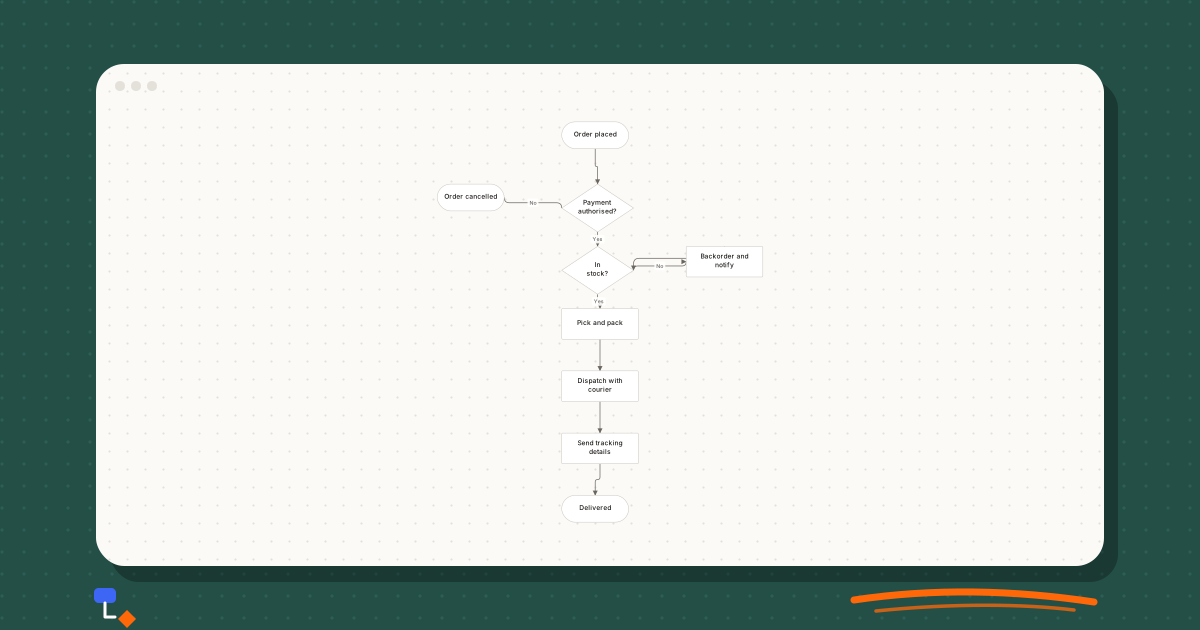
A flowchart tells you what happens. It is much worse at telling you who does it. You can write the team name inside each box, but the reader then has to scan every label to work out where responsibility changes, and those changes are usually where the process goes wrong.
A swimlane diagram solves this by giving each owner a lane, like lanes in a swimming pool. Steps sit in the lane of whoever does them. When work passes from one team to another, the arrow crosses a lane boundary, and the handoff becomes something you can see from across the room.
Lanes mean responsibility
Each lane represents one actor: a person, a role, a team, an external party or sometimes a system. The rule is simple. A step goes in the lane of whoever is responsible for doing it. Everything else about the diagram follows the normal conventions of a flowchart: rectangles for steps, diamonds for decisions, labelled arrows for flow.
Choosing the actors is the first real decision. Roles usually work better than named people, because people change jobs and the diagram should outlive them. Teams work well for cross-department processes. Individual roles work better inside a team, where the interesting question is which of three people does what.
External parties deserve a lane too. The customer is the most common one. Putting the customer in the top lane is a useful habit, because it makes every point where the customer waits on you, or you wait on them, impossible to miss.
A lane is about responsibility, not about who is involved. If the sales team is copied on an email but takes no action, they do not need a step. A lane full of "informed" steps is noise.
The example: from order to invoice
Consider a small business that sells equipment to other businesses. The process from order to invoice involves four parties: the customer places an order, sales confirms it, operations ships it, and finance invoices it. Everyone involved would describe this as simple. It is a good example precisely because it is simple, and because it still has four handoffs.
Drawn first as a plain flowchart, the fulfilment part of the process might look like this. It is clear about sequence and decisions, but there is no indication of who does any of it.
%20scale(0.46)%20translate(0%2C0)%22%3E%3Cline%20x1%3D%22330%22%20y1%3D%2228%22%20x2%3D%22335%22%20y2%3D%22180%22%20stroke%3D%22%236b6660%22%20stroke-width%3D%221.5%22%2F%3E%3Cline%20x1%3D%22335%22%20y1%3D%22180%22%20x2%3D%2270%22%20y2%3D%22158%22%20stroke%3D%22%236b6660%22%20stroke-width%3D%221.5%22%2F%3E%3Cline%20x1%3D%22335%22%20y1%3D%22180%22%20x2%3D%22335%22%20y2%3D%22310%22%20stroke%3D%22%236b6660%22%20stroke-width%3D%221.5%22%2F%3E%3Cline%20x1%3D%22335%22%20y1%3D%22310%22%20x2%3D%22600%22%20y2%3D%22292%22%20stroke%3D%22%236b6660%22%20stroke-width%3D%221.5%22%2F%3E%3Cline%20x1%3D%22600%22%20y1%3D%22292%22%20x2%3D%22335%22%20y2%3D%22310%22%20stroke%3D%22%236b6660%22%20stroke-width%3D%221.5%22%2F%3E%3Cline%20x1%3D%22335%22%20y1%3D%22310%22%20x2%3D%22340%22%20y2%3D%22422%22%20stroke%3D%22%236b6660%22%20stroke-width%3D%221.5%22%2F%3E%3Cline%20x1%3D%22340%22%20y1%3D%22422%22%20x2%3D%22340%22%20y2%3D%22552%22%20stroke%3D%22%236b6660%22%20stroke-width%3D%221.5%22%2F%3E%3Cline%20x1%3D%22340%22%20y1%3D%22552%22%20x2%3D%22340%22%20y2%3D%22682%22%20stroke%3D%22%236b6660%22%20stroke-width%3D%221.5%22%2F%3E%3Cline%20x1%3D%22340%22%20y1%3D%22682%22%20x2%3D%22330%22%20y2%3D%22808%22%20stroke%3D%22%236b6660%22%20stroke-width%3D%221.5%22%2F%3E%3Cg%20transform%3D%22translate(260%2C0)%22%20opacity%3D%221%22%3E%3Crect%20x%3D%220%22%20y%3D%220%22%20width%3D%22140%22%20height%3D%2256%22%20rx%3D%2228%22%20fill%3D%22%23ffffff%22%20stroke%3D%22%23c8c4bd%22%20stroke-width%3D%221%22%2F%3E%3C%2Fg%3E%3Cg%20transform%3D%22translate(260%2C130)%22%20opacity%3D%221%22%3E%3Cpath%20d%3D%22M75%2C0%20L150%2C50%20L75%2C100%20L0%2C50%20Z%22%20fill%3D%22%23ffffff%22%20stroke%3D%22%23c8c4bd%22%20stroke-width%3D%221%22%2F%3E%3C%2Fg%3E%3Cg%20transform%3D%22translate(0%2C130)%22%20opacity%3D%221%22%3E%3Crect%20x%3D%220%22%20y%3D%220%22%20width%3D%22140%22%20height%3D%2256%22%20rx%3D%2228%22%20fill%3D%22%23ffffff%22%20stroke%3D%22%23c8c4bd%22%20stroke-width%3D%221%22%2F%3E%3C%2Fg%3E%3Cg%20transform%3D%22translate(260%2C260)%22%20opacity%3D%221%22%3E%3Cpath%20d%3D%22M75%2C0%20L150%2C50%20L75%2C100%20L0%2C50%20Z%22%20fill%3D%22%23ffffff%22%20stroke%3D%22%23c8c4bd%22%20stroke-width%3D%221%22%2F%3E%3C%2Fg%3E%3Cg%20transform%3D%22translate(520%2C260)%22%20opacity%3D%221%22%3E%3Crect%20x%3D%220%22%20y%3D%220%22%20width%3D%22160%22%20height%3D%2264%22%20rx%3D%222%22%20fill%3D%22%23ffffff%22%20stroke%3D%22%23c8c4bd%22%20stroke-width%3D%221%22%2F%3E%3C%2Fg%3E%3Cg%20transform%3D%22translate(260%2C390)%22%20opacity%3D%221%22%3E%3Crect%20x%3D%220%22%20y%3D%220%22%20width%3D%22160%22%20height%3D%2264%22%20rx%3D%222%22%20fill%3D%22%23ffffff%22%20stroke%3D%22%23c8c4bd%22%20stroke-width%3D%221%22%2F%3E%3C%2Fg%3E%3Cg%20transform%3D%22translate(260%2C520)%22%20opacity%3D%221%22%3E%3Crect%20x%3D%220%22%20y%3D%220%22%20width%3D%22160%22%20height%3D%2264%22%20rx%3D%222%22%20fill%3D%22%23ffffff%22%20stroke%3D%22%23c8c4bd%22%20stroke-width%3D%221%22%2F%3E%3C%2Fg%3E%3Cg%20transform%3D%22translate(260%2C650)%22%20opacity%3D%221%22%3E%3Crect%20x%3D%220%22%20y%3D%220%22%20width%3D%22160%22%20height%3D%2264%22%20rx%3D%222%22%20fill%3D%22%23ffffff%22%20stroke%3D%22%23c8c4bd%22%20stroke-width%3D%221%22%2F%3E%3C%2Fg%3E%3Cg%20transform%3D%22translate(260%2C780)%22%20opacity%3D%221%22%3E%3Crect%20x%3D%220%22%20y%3D%220%22%20width%3D%22140%22%20height%3D%2256%22%20rx%3D%2228%22%20fill%3D%22%23ffffff%22%20stroke%3D%22%23c8c4bd%22%20stroke-width%3D%221%22%2F%3E%3C%2Fg%3E%3C%2Fg%3E%3C%2Fsvg%3E)
Now the same process in lanes. The steps below are listed by lane in the order they happen; on the diagram, each would sit in its own lane, left to right in time.
| Lane | Steps in this lane |
|---|---|
| Customer | 1. Place order. 10. Receive goods. 13. Pay invoice. |
| Sales | 2. Check order against price list. 3. Decision: details correct? (No: 4. Query customer and loop to 2.) 5. Confirm order to customer. 6. Pass order to operations. |
| Operations | 7. Decision: in stock? (No: backorder and notify sales.) 8. Pick and pack. 9. Dispatch with courier. 11. Confirm dispatch to finance. |
| Finance | 12. Raise invoice. 14. Decision: paid within terms? (No: send reminder.) 15. Mark as paid. |
Read the numbers in order and follow the arrows between lanes. The process starts with the customer, crosses into sales, comes back to the customer for confirmation, crosses into operations, out to the customer with the goods, into finance, and back to the customer once more for payment.
Handoffs: the lines that cross
In the order example, there are at least six points where work crosses from one lane to another. Each one is a moment where something has to be communicated, and a moment where it can fail to be. Swimlanes do not fix handoffs, but they make every one countable.
When reviewing a swimlane diagram, walk each crossing and ask three questions.
- What exactly is handed over? An email, a record in a system, a phone call, a physical item. If nobody can say, the handoff is relying on memory.
- How does the receiving team know it has arrived? A step that waits for something to land in an inbox someone checks once a day has a built-in delay.
- Who notices if it never arrives? This is the question that usually has no answer, and it is the one that explains orders that sit unshipped for a week.
In the example, step 11 is the interesting one. Operations confirms dispatch to finance, and only then does finance raise the invoice. If that confirmation is a manual email, invoices depend on someone in the warehouse remembering to send it. On a flowchart, "Raise invoice" simply follows "Dispatch". In lanes, the gap between two teams is drawn right there on the page.
A related pattern is the ping-pong: an arrow that crosses a lane boundary and comes straight back. Sales queries the customer, the customer replies, sales queries again. Several back-and-forth crossings between the same two lanes usually mean information is being collected one piece at a time when it could have been asked for once.
What the lanes reveal in the example
Two problems in the order process are hard to see on the flowchart and obvious in lanes. The first is sequencing between sales and operations. Sales confirms the order to the customer at step 5, and operations only checks stock at step 7. The customer has been told the order is confirmed before anyone knows whether it can be fulfilled. In lanes, the confirmation arrow to the customer sits visibly to the left of the stock decision, and the question asks itself: should sales check stock before confirming, or should the confirmation say something different?
The second is that the backorder path ends in the sales lane, but nothing in the sales lane says what happens next. Does sales tell the customer? Offer an alternative? Wait? The flowchart had a tidy loop back to the stock check. The swimlane version shows that the loop passes through a team with no defined action, which is exactly where a delayed order goes quiet.
Neither of these is a drawing trick. The information was all in the flowchart. Lanes simply arrange it so that responsibility and timing can be read together.
Horizontal or vertical lanes
Lanes can run either way. The choice is practical, not doctrinal, but it is worth making deliberately.
| Horizontal lanes | Vertical lanes | |
|---|---|---|
| Time flows | Left to right | Top to bottom |
| Lane labels | Down the left edge | Across the top |
| Suits | Many owners, longer processes | Few owners, many steps |
| Fits | Landscape slides and wide screens | Portrait documents and long pages |
| Watch for | Very wide diagrams that need scrolling | Narrow lanes that cramp step labels |
Horizontal is the more common convention for business processes, partly because slides and screens are wider than they are tall, and partly because reading left to right matches how most people think about time passing. Vertical lanes work well when there are only two or three owners and the process is long, such as a support process split between a front-line team and an engineering team.
Whichever you choose, keep it consistent across a set of related diagrams. Readers who have learned where to look for lane names on one diagram should not have to relearn it on the next.
Common mistakes
- Lanes named after people rather than roles. The diagram goes out of date the first time someone changes job.
- A step straddling two lanes. Every step needs one owner. If two teams share it, split it into what each does, or assign it to whoever is accountable.
- Lanes with a single step. A lane that holds one box often belongs to someone who is consulted rather than responsible. Consider removing it and noting the dependency in the step label.
- Lane order that forces lines to cross. Put lanes that hand work to each other next to each other. If the customer and finance trade three messages, they should not be four lanes apart.
- Arrows that cross lanes without saying what moves. A label such as "Order record" or "Signed form" on a handoff arrow costs nothing and answers the first review question.
- Too many lanes. Past six or seven, the diagram usually covers more than one process, or lanes are standing in for sub-teams that do not matter to this reader.
- Leaving out the customer. The process feels internal, so the customer lane is dropped, and every point where the customer waits disappears with it.
Swimlanes at different levels of detail
Swimlanes are a format rather than a level. You can draw a high-level process map in lanes, where each lane holds one or two stages, or a detailed workflow in lanes, where every decision and exception sits in its owner's lane. The order example above is at workflow level. A version for a board pack might have one box per lane.
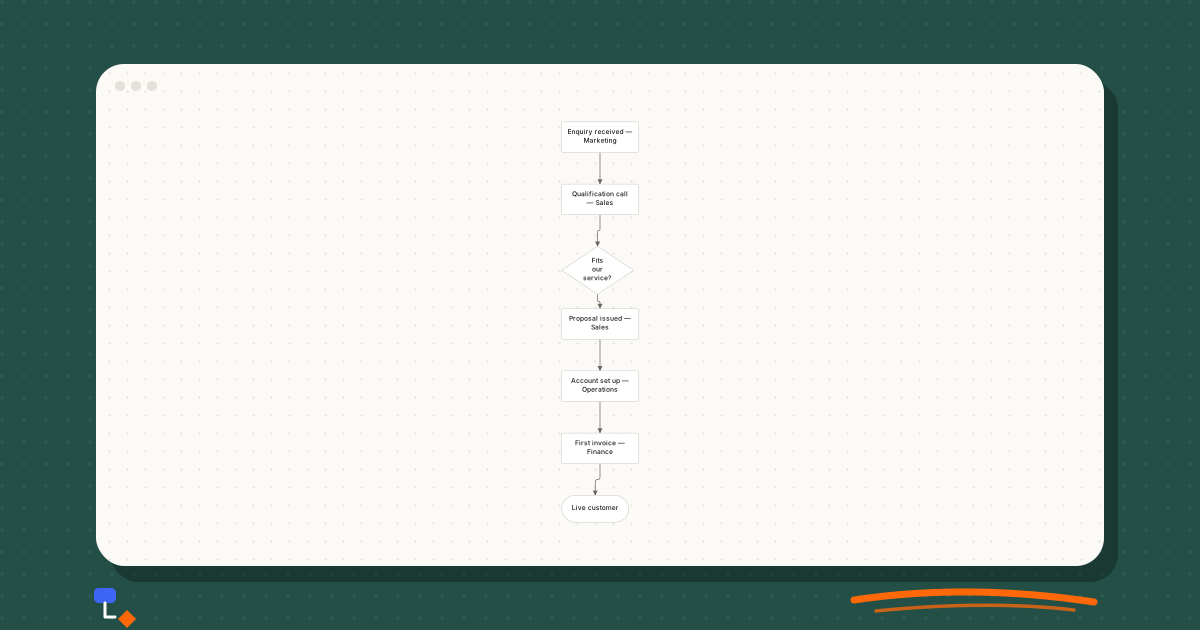
Even without drawn lanes, a stage-level map can carry ownership in its labels. The diagram below puts the owning team after each step, which reads like a compressed swimlane: the team name changes four times, and each change is a handoff.
%20scale(0.46)%20translate(-260%2C0)%22%3E%3Cline%20x1%3D%22340%22%20y1%3D%2232%22%20x2%3D%22340%22%20y2%3D%22162%22%20stroke%3D%22%236b6660%22%20stroke-width%3D%221.5%22%2F%3E%3Cline%20x1%3D%22340%22%20y1%3D%22162%22%20x2%3D%22335%22%20y2%3D%22310%22%20stroke%3D%22%236b6660%22%20stroke-width%3D%221.5%22%2F%3E%3Cline%20x1%3D%22335%22%20y1%3D%22310%22%20x2%3D%22340%22%20y2%3D%22422%22%20stroke%3D%22%236b6660%22%20stroke-width%3D%221.5%22%2F%3E%3Cline%20x1%3D%22340%22%20y1%3D%22422%22%20x2%3D%22340%22%20y2%3D%22552%22%20stroke%3D%22%236b6660%22%20stroke-width%3D%221.5%22%2F%3E%3Cline%20x1%3D%22340%22%20y1%3D%22552%22%20x2%3D%22340%22%20y2%3D%22682%22%20stroke%3D%22%236b6660%22%20stroke-width%3D%221.5%22%2F%3E%3Cline%20x1%3D%22340%22%20y1%3D%22682%22%20x2%3D%22330%22%20y2%3D%22808%22%20stroke%3D%22%236b6660%22%20stroke-width%3D%221.5%22%2F%3E%3Cg%20transform%3D%22translate(260%2C0)%22%20opacity%3D%221%22%3E%3Crect%20x%3D%220%22%20y%3D%220%22%20width%3D%22160%22%20height%3D%2264%22%20rx%3D%222%22%20fill%3D%22%23ffffff%22%20stroke%3D%22%23c8c4bd%22%20stroke-width%3D%221%22%2F%3E%3C%2Fg%3E%3Cg%20transform%3D%22translate(260%2C130)%22%20opacity%3D%221%22%3E%3Crect%20x%3D%220%22%20y%3D%220%22%20width%3D%22160%22%20height%3D%2264%22%20rx%3D%222%22%20fill%3D%22%23ffffff%22%20stroke%3D%22%23c8c4bd%22%20stroke-width%3D%221%22%2F%3E%3C%2Fg%3E%3Cg%20transform%3D%22translate(260%2C260)%22%20opacity%3D%221%22%3E%3Cpath%20d%3D%22M75%2C0%20L150%2C50%20L75%2C100%20L0%2C50%20Z%22%20fill%3D%22%23ffffff%22%20stroke%3D%22%23c8c4bd%22%20stroke-width%3D%221%22%2F%3E%3C%2Fg%3E%3Cg%20transform%3D%22translate(260%2C390)%22%20opacity%3D%221%22%3E%3Crect%20x%3D%220%22%20y%3D%220%22%20width%3D%22160%22%20height%3D%2264%22%20rx%3D%222%22%20fill%3D%22%23ffffff%22%20stroke%3D%22%23c8c4bd%22%20stroke-width%3D%221%22%2F%3E%3C%2Fg%3E%3Cg%20transform%3D%22translate(260%2C520)%22%20opacity%3D%221%22%3E%3Crect%20x%3D%220%22%20y%3D%220%22%20width%3D%22160%22%20height%3D%2264%22%20rx%3D%222%22%20fill%3D%22%23ffffff%22%20stroke%3D%22%23c8c4bd%22%20stroke-width%3D%221%22%2F%3E%3C%2Fg%3E%3Cg%20transform%3D%22translate(260%2C650)%22%20opacity%3D%221%22%3E%3Crect%20x%3D%220%22%20y%3D%220%22%20width%3D%22160%22%20height%3D%2264%22%20rx%3D%222%22%20fill%3D%22%23ffffff%22%20stroke%3D%22%23c8c4bd%22%20stroke-width%3D%221%22%2F%3E%3C%2Fg%3E%3Cg%20transform%3D%22translate(260%2C780)%22%20opacity%3D%221%22%3E%3Crect%20x%3D%220%22%20y%3D%220%22%20width%3D%22140%22%20height%3D%2256%22%20rx%3D%2228%22%20fill%3D%22%23ffffff%22%20stroke%3D%22%23c8c4bd%22%20stroke-width%3D%221%22%2F%3E%3C%2Fg%3E%3C%2Fg%3E%3C%2Fsvg%3E)
If you find yourself writing an owner in every label like this, it is a strong hint that lanes would read better. The swimlane version would turn each change of team name into a line crossing a boundary.
Drawing a swimlane diagram step by step
- Write down the trigger and the outcome. For the example: "Customer places order" and "Invoice paid".
- List the actors who do something between them. Keep it to the ones responsible for a step.
- Order the lanes so that teams who hand work to each other are adjacent, with the customer at the top.
- Place the steps of the ordinary path, each in its owner's lane, moving along the time axis.
- Add decisions and their branches, keeping each branch in the lane of whoever acts on it.
- Label every arrow that crosses a lane with what is being handed over.
- Walk one real recent case through it with someone from each lane, and fix whatever they say is wrong.
Swimlanes in DiagramDock
DiagramDock includes a swimlane diagram type alongside flowcharts and process maps, each with its own palette. A practical approach is to draft the sequence as a flowchart first, where quick-add and one-click Yes and No labels keep the drawing fast, then redraw it in lanes once the steps are agreed. The suggestions panel in the flowchart editor flags unlabelled decision branches and unreachable steps, which is worth clearing before the lanes go in.
Diagrams stay in your browser, and export to SVG and PDF produces vector output with selectable text, which holds up when a wide swimlane diagram is printed or dropped into a document.
Questions
- What is a swimlane diagram used for?
- It shows a process together with who is responsible for each step. Each lane belongs to one person, role or team, so the diagram makes ownership and handoffs between teams visible in a way a plain flowchart does not.
- Should swimlanes be horizontal or vertical?
- Horizontal lanes suit processes that read left to right and have several owners, and they fit landscape pages and screens well. Vertical lanes suit processes that read top to bottom, with a small number of owners. Pick one and keep it consistent across related diagrams.
- Can a step belong to two lanes?
- Not cleanly. If two teams genuinely do a step together, either split it into the part each team does, or put it in the lane of whoever is accountable for it and note the other team in the label.
- How many lanes is too many?
- There is no fixed limit, but past six or seven lanes most diagrams become hard to read. If you need more, check whether some lanes hold only one step, and whether the process is really two processes that should be drawn separately.
Keep reading
Business processes9 min read
The difference between a process map and a workflow
Precise definitions of process maps and workflows, the levels of detail each works at, who reads them, and one refund process drawn both ways.
Business processes10 min read
The case for drawing a process before trying to fix it
Why as-is mapping comes before improvement, how to run a mapping session, and where handoffs, waits, rework loops and approval chains show up on the page.
Flowcharts11 min read
Flowchart symbols explained without the jargon
What each flowchart shape means, the four you need for almost every diagram, when the specialised ones earn their place, and how shapes get misused.
Business processes9 min read
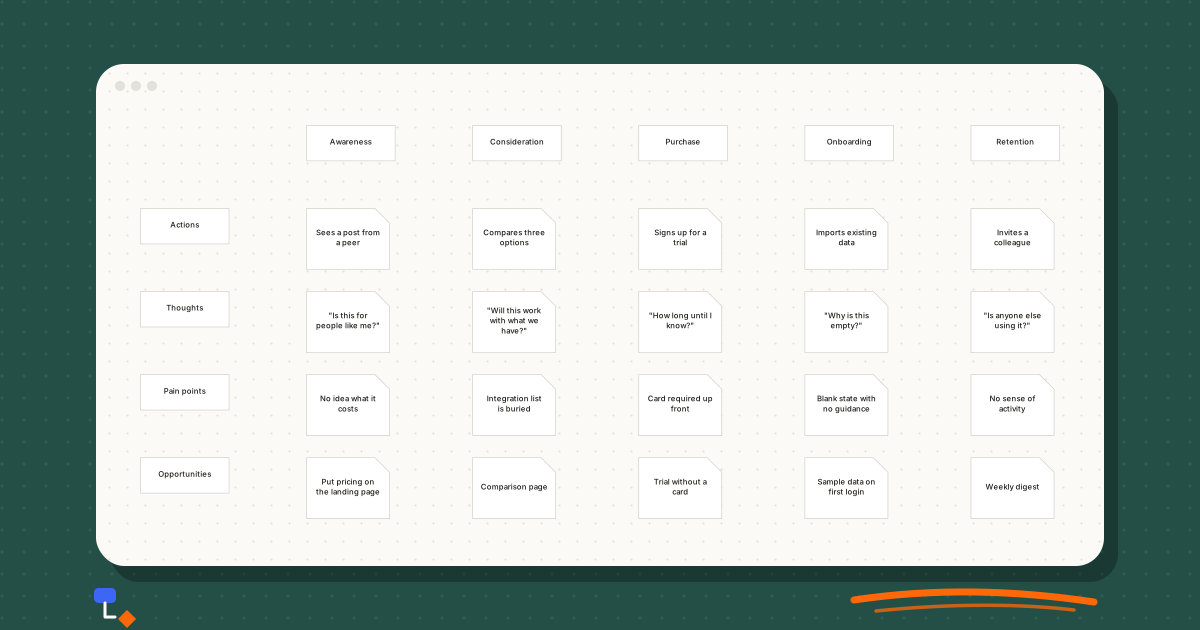
Customer journey maps: what the rows and columns actually mean
What each stage and row of a customer journey map is for, how to fill it from evidence rather than guesswork, and a worked example for a software trial.