Customer journey map
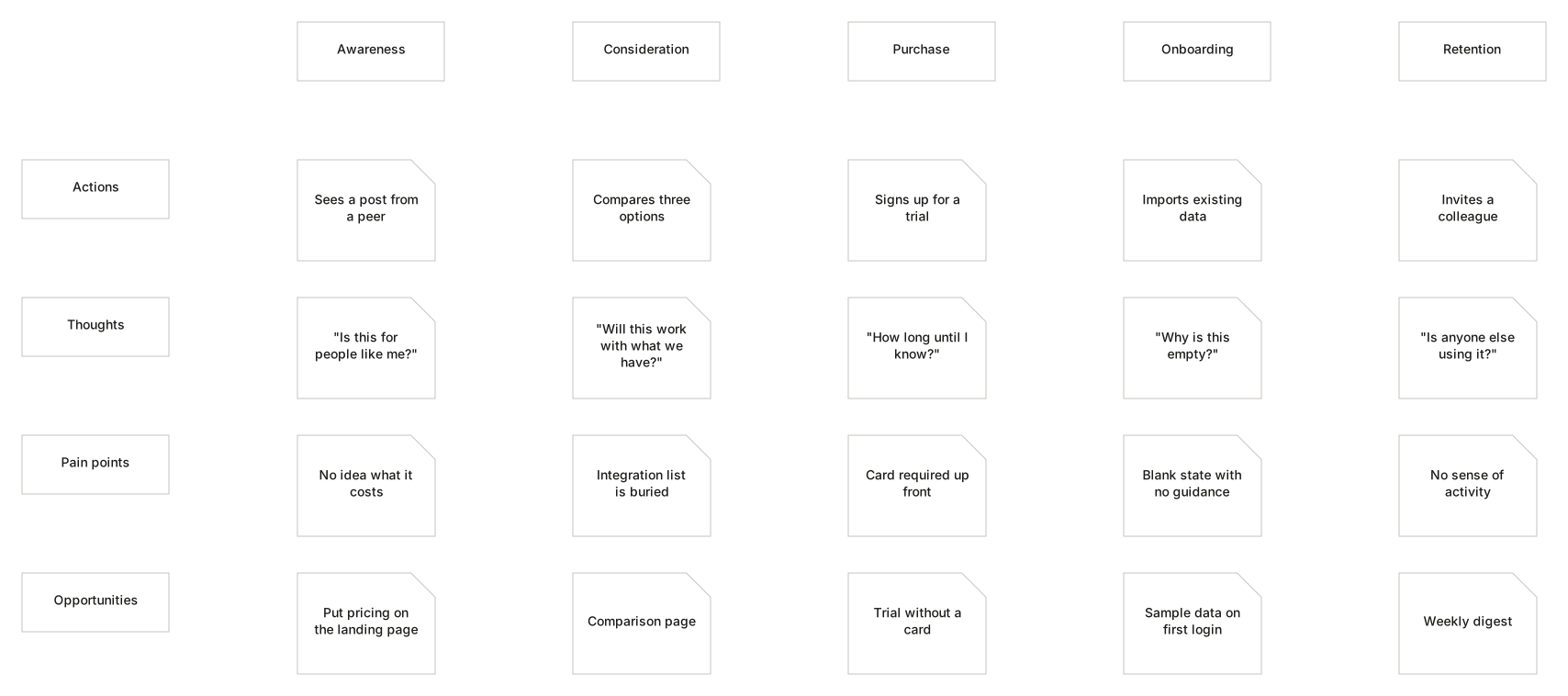
Stages across the top, layers down the side. The default grid is a starting point — both axes are yours to rename, reorder or throw away.
No account. Saved in this browser until you export it.
The pieces
What goes on the canvas
- Sticky
- One observation in a cell
- Touchpoint
- Where the customer meets you
- Pain point
- Where it goes wrong
Building one
From blank canvas to finished diagram
- 1Name the stages your customer actually passes through, not the ones your org chart has.
- 2Fill the Actions row first. What the customer does is the spine everything else hangs from.
- 3Add thoughts, questions and pain points from research rather than from the room.
- 4Opportunities come last. They are conclusions, not inputs.
Examples
Start from a real one
Where it helps
Good uses
Service design
Where the experience breaks between departments.
Onboarding review
The gap between what you built and what they meet.
Support analysis
Turning ticket themes into a picture.
Workshop output
Somewhere for the sticky notes to live afterwards.
Questions
Asked often
- Can I change the rows and columns?
- Yes, entirely. Add, remove, rename and reorder both. The defaults are a common starting point, not a template you must obey.
- Will I lose cell content if I reorder?
- No. Cells are keyed to rows and columns by identity, so renaming and reordering never disturbs what is in them.
- How many stages should there be?
- Enough that each one is a genuinely different mode for the customer. Five is common; three is often enough.
- Can I export it?
- Project files work now. Image and PDF export arrive with the export phase.
Map what they actually experience
Nothing to sign up for. The diagram stays on this device.