What belongs on a product roadmap?
Outcomes or features, Now/Next/Later or dates, and what to leave off: a practical guide to product roadmaps that stay honest as plans change.
The DiagramDock team · · 9 min read
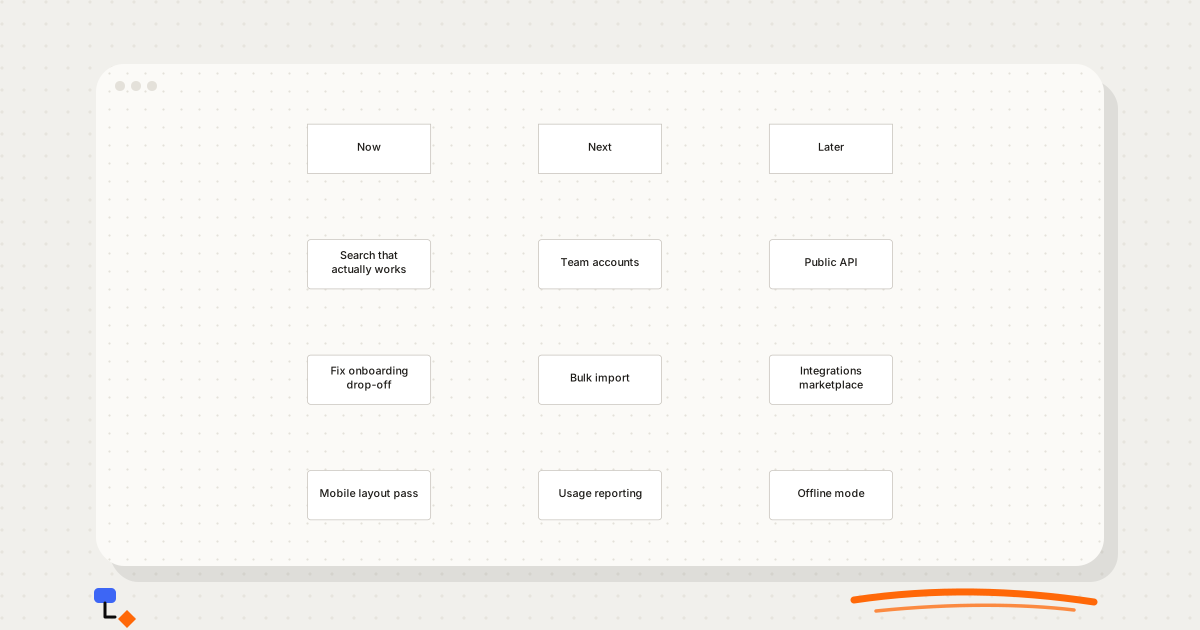
A product roadmap is supposed to answer a simple question: what is the team going to work on, and why in that order? In practice many roadmaps answer a different one. They become a list of every feature anyone has asked for, laid out on a calendar, with dates that everyone privately knows are guesses. Six weeks later the dates have slipped, the list has grown, and the roadmap is quietly ignored.
The fix is mostly a matter of deciding what belongs on it. A roadmap that carries the right things, at the right level of detail, survives contact with reality. One that carries everything does not.
Outcomes versus features
The most useful shift is to describe items by the problem they solve rather than the thing that will be built. "Add filters to search" is a feature. "Search that actually works" is an outcome, and it leaves room for the team to discover that the real fix is better ranking, not more filters.
Outcome-framed items have a practical advantage: they stay true longer. When the team learns something, the item does not need rewriting, only the work beneath it. A feature-framed item is either delivered as specified or visibly abandoned.
| Feature framing | Outcome framing | Why the second ages better |
|---|---|---|
| Add a guided tour | Fix onboarding drop-off | The tour might not be the answer; the drop-off is the problem |
| Responsive breakpoints for tablet | Mobile layout pass | Covers whatever the audit finds, not one guessed fix |
| CSV upload | Bulk import | Leaves the format open until customers are asked |
| Export usage to spreadsheet | Usage reporting | Admins may need a dashboard, not a file |
Pure outcomes can drift into vagueness. "Improve retention" is true of every product and tells nobody what to do on Monday. A good roadmap item names a specific problem a specific group of users has, short enough to fit in a box, concrete enough that the team could tell when it is solved.
A practical test for each item: could someone outside the team read it and say who benefits? "Team accounts" passes, because it plainly serves customers with more than one user. "Platform improvements" fails, because it could mean anything. If an item only makes sense to the people who wrote it, rewrite it before it goes on the roadmap, or it will be misread by everyone else who sees it.
Now/Next/Later or a dated grid
There are two common layouts. A dated roadmap puts items in columns by quarter or month. A Now/Next/Later roadmap uses three horizons: what the team is working on, what comes after that, and what is planned but not yet scheduled.
%20scale(0.75)%20translate(0%2C0)%22%3E%3Cg%20transform%3D%22translate(0%2C0)%22%20opacity%3D%221%22%3E%3Crect%20x%3D%220%22%20y%3D%220%22%20width%3D%22160%22%20height%3D%2264%22%20rx%3D%220%22%20fill%3D%22%23ffffff%22%20stroke%3D%22%23c8c4bd%22%20stroke-width%3D%221%22%2F%3E%3C%2Fg%3E%3Cg%20transform%3D%22translate(300%2C0)%22%20opacity%3D%221%22%3E%3Crect%20x%3D%220%22%20y%3D%220%22%20width%3D%22160%22%20height%3D%2264%22%20rx%3D%220%22%20fill%3D%22%23ffffff%22%20stroke%3D%22%23c8c4bd%22%20stroke-width%3D%221%22%2F%3E%3C%2Fg%3E%3Cg%20transform%3D%22translate(600%2C0)%22%20opacity%3D%221%22%3E%3Crect%20x%3D%220%22%20y%3D%220%22%20width%3D%22160%22%20height%3D%2264%22%20rx%3D%220%22%20fill%3D%22%23ffffff%22%20stroke%3D%22%23c8c4bd%22%20stroke-width%3D%221%22%2F%3E%3C%2Fg%3E%3Cg%20transform%3D%22translate(0%2C150)%22%20opacity%3D%221%22%3E%3Crect%20x%3D%220%22%20y%3D%220%22%20width%3D%22160%22%20height%3D%2264%22%20rx%3D%224%22%20fill%3D%22%23ffffff%22%20stroke%3D%22%23c8c4bd%22%20stroke-width%3D%221%22%2F%3E%3C%2Fg%3E%3Cg%20transform%3D%22translate(0%2C300)%22%20opacity%3D%221%22%3E%3Crect%20x%3D%220%22%20y%3D%220%22%20width%3D%22160%22%20height%3D%2264%22%20rx%3D%224%22%20fill%3D%22%23ffffff%22%20stroke%3D%22%23c8c4bd%22%20stroke-width%3D%221%22%2F%3E%3C%2Fg%3E%3Cg%20transform%3D%22translate(0%2C450)%22%20opacity%3D%221%22%3E%3Crect%20x%3D%220%22%20y%3D%220%22%20width%3D%22160%22%20height%3D%2264%22%20rx%3D%224%22%20fill%3D%22%23ffffff%22%20stroke%3D%22%23c8c4bd%22%20stroke-width%3D%221%22%2F%3E%3C%2Fg%3E%3Cg%20transform%3D%22translate(300%2C150)%22%20opacity%3D%221%22%3E%3Crect%20x%3D%220%22%20y%3D%220%22%20width%3D%22160%22%20height%3D%2264%22%20rx%3D%224%22%20fill%3D%22%23ffffff%22%20stroke%3D%22%23c8c4bd%22%20stroke-width%3D%221%22%2F%3E%3C%2Fg%3E%3Cg%20transform%3D%22translate(300%2C300)%22%20opacity%3D%221%22%3E%3Crect%20x%3D%220%22%20y%3D%220%22%20width%3D%22160%22%20height%3D%2264%22%20rx%3D%224%22%20fill%3D%22%23ffffff%22%20stroke%3D%22%23c8c4bd%22%20stroke-width%3D%221%22%2F%3E%3C%2Fg%3E%3Cg%20transform%3D%22translate(300%2C450)%22%20opacity%3D%221%22%3E%3Crect%20x%3D%220%22%20y%3D%220%22%20width%3D%22160%22%20height%3D%2264%22%20rx%3D%224%22%20fill%3D%22%23ffffff%22%20stroke%3D%22%23c8c4bd%22%20stroke-width%3D%221%22%2F%3E%3C%2Fg%3E%3Cg%20transform%3D%22translate(600%2C150)%22%20opacity%3D%221%22%3E%3Crect%20x%3D%220%22%20y%3D%220%22%20width%3D%22160%22%20height%3D%2264%22%20rx%3D%224%22%20fill%3D%22%23ffffff%22%20stroke%3D%22%23c8c4bd%22%20stroke-width%3D%221%22%2F%3E%3C%2Fg%3E%3Cg%20transform%3D%22translate(600%2C300)%22%20opacity%3D%221%22%3E%3Crect%20x%3D%220%22%20y%3D%220%22%20width%3D%22160%22%20height%3D%2264%22%20rx%3D%224%22%20fill%3D%22%23ffffff%22%20stroke%3D%22%23c8c4bd%22%20stroke-width%3D%221%22%2F%3E%3C%2Fg%3E%3Cg%20transform%3D%22translate(600%2C450)%22%20opacity%3D%221%22%3E%3Crect%20x%3D%220%22%20y%3D%220%22%20width%3D%22160%22%20height%3D%2264%22%20rx%3D%224%22%20fill%3D%22%23ffffff%22%20stroke%3D%22%23c8c4bd%22%20stroke-width%3D%221%22%2F%3E%3C%2Fg%3E%3C%2Fg%3E%3C%2Fsvg%3E)
Now/Next/Later commits to order without committing to time. That makes it honest about what the team actually knows. It also makes it easier to update: when an item takes longer, nothing has to be re-dated, and the items behind it simply wait.
Dated roadmaps have a place. Organisations that budget by quarter, products tied to external events, and work with contractual deadlines all need dates somewhere. The mistake is giving every item a date because some items need one.
%20scale(0.69)%20translate(0%2C0)%22%3E%3Cg%20transform%3D%22translate(0%2C0)%22%20opacity%3D%221%22%3E%3Crect%20x%3D%220%22%20y%3D%220%22%20width%3D%22160%22%20height%3D%2264%22%20rx%3D%220%22%20fill%3D%22%23ffffff%22%20stroke%3D%22%23c8c4bd%22%20stroke-width%3D%221%22%2F%3E%3C%2Fg%3E%3Cg%20transform%3D%22translate(300%2C0)%22%20opacity%3D%221%22%3E%3Crect%20x%3D%220%22%20y%3D%220%22%20width%3D%22160%22%20height%3D%2264%22%20rx%3D%220%22%20fill%3D%22%23ffffff%22%20stroke%3D%22%23c8c4bd%22%20stroke-width%3D%221%22%2F%3E%3C%2Fg%3E%3Cg%20transform%3D%22translate(600%2C0)%22%20opacity%3D%221%22%3E%3Crect%20x%3D%220%22%20y%3D%220%22%20width%3D%22160%22%20height%3D%2264%22%20rx%3D%220%22%20fill%3D%22%23ffffff%22%20stroke%3D%22%23c8c4bd%22%20stroke-width%3D%221%22%2F%3E%3C%2Fg%3E%3Cg%20transform%3D%22translate(900%2C0)%22%20opacity%3D%221%22%3E%3Crect%20x%3D%220%22%20y%3D%220%22%20width%3D%22160%22%20height%3D%2264%22%20rx%3D%220%22%20fill%3D%22%23ffffff%22%20stroke%3D%22%23c8c4bd%22%20stroke-width%3D%221%22%2F%3E%3C%2Fg%3E%3Cg%20transform%3D%22translate(0%2C150)%22%20opacity%3D%221%22%3E%3Crect%20x%3D%220%22%20y%3D%220%22%20width%3D%22160%22%20height%3D%2264%22%20rx%3D%224%22%20fill%3D%22%23ffffff%22%20stroke%3D%22%23c8c4bd%22%20stroke-width%3D%221%22%2F%3E%3C%2Fg%3E%3Cg%20transform%3D%22translate(0%2C300)%22%20opacity%3D%221%22%3E%3Crect%20x%3D%220%22%20y%3D%220%22%20width%3D%22160%22%20height%3D%2264%22%20rx%3D%224%22%20fill%3D%22%23ffffff%22%20stroke%3D%22%23c8c4bd%22%20stroke-width%3D%221%22%2F%3E%3C%2Fg%3E%3Cg%20transform%3D%22translate(300%2C150)%22%20opacity%3D%221%22%3E%3Crect%20x%3D%220%22%20y%3D%220%22%20width%3D%22160%22%20height%3D%2264%22%20rx%3D%224%22%20fill%3D%22%23ffffff%22%20stroke%3D%22%23c8c4bd%22%20stroke-width%3D%221%22%2F%3E%3C%2Fg%3E%3Cg%20transform%3D%22translate(300%2C300)%22%20opacity%3D%221%22%3E%3Crect%20x%3D%220%22%20y%3D%220%22%20width%3D%22160%22%20height%3D%2264%22%20rx%3D%224%22%20fill%3D%22%23ffffff%22%20stroke%3D%22%23c8c4bd%22%20stroke-width%3D%221%22%2F%3E%3C%2Fg%3E%3Cg%20transform%3D%22translate(600%2C150)%22%20opacity%3D%221%22%3E%3Crect%20x%3D%220%22%20y%3D%220%22%20width%3D%22160%22%20height%3D%2264%22%20rx%3D%224%22%20fill%3D%22%23ffffff%22%20stroke%3D%22%23c8c4bd%22%20stroke-width%3D%221%22%2F%3E%3C%2Fg%3E%3Cg%20transform%3D%22translate(600%2C300)%22%20opacity%3D%221%22%3E%3Crect%20x%3D%220%22%20y%3D%220%22%20width%3D%22160%22%20height%3D%2264%22%20rx%3D%224%22%20fill%3D%22%23ffffff%22%20stroke%3D%22%23c8c4bd%22%20stroke-width%3D%221%22%2F%3E%3C%2Fg%3E%3Cg%20transform%3D%22translate(900%2C150)%22%20opacity%3D%221%22%3E%3Crect%20x%3D%220%22%20y%3D%220%22%20width%3D%22160%22%20height%3D%2264%22%20rx%3D%224%22%20fill%3D%22%23ffffff%22%20stroke%3D%22%23c8c4bd%22%20stroke-width%3D%221%22%2F%3E%3C%2Fg%3E%3Cg%20transform%3D%22translate(900%2C300)%22%20opacity%3D%221%22%3E%3Crect%20x%3D%220%22%20y%3D%220%22%20width%3D%22160%22%20height%3D%2264%22%20rx%3D%224%22%20fill%3D%22%23ffffff%22%20stroke%3D%22%23c8c4bd%22%20stroke-width%3D%221%22%2F%3E%3C%2Fg%3E%3C%2Fg%3E%3C%2Fsvg%3E)
| Use | When |
|---|---|
| Now/Next/Later | Product teams setting priorities; anything where estimates beyond a few weeks are unreliable |
| Quarterly grid | Budget cycles, regulated work, commitments to partners or large customers |
| Stages (Validate, Build, Grow) | Early-stage companies where progress depends on learning, not time |
| Hybrid | Dates for the few fixed commitments, horizons for everything else |
Stage-based roadmaps deserve more use than they get. For a young company, the honest unit of progress is not a quarter but a question answered. Until customer interviews and a pricing experiment have told you something, scheduling a sales hire for a particular month is guesswork dressed as planning.
%20scale(0.75)%20translate(0%2C0)%22%3E%3Cg%20transform%3D%22translate(0%2C0)%22%20opacity%3D%221%22%3E%3Crect%20x%3D%220%22%20y%3D%220%22%20width%3D%22160%22%20height%3D%2264%22%20rx%3D%220%22%20fill%3D%22%23ffffff%22%20stroke%3D%22%23c8c4bd%22%20stroke-width%3D%221%22%2F%3E%3C%2Fg%3E%3Cg%20transform%3D%22translate(300%2C0)%22%20opacity%3D%221%22%3E%3Crect%20x%3D%220%22%20y%3D%220%22%20width%3D%22160%22%20height%3D%2264%22%20rx%3D%220%22%20fill%3D%22%23ffffff%22%20stroke%3D%22%23c8c4bd%22%20stroke-width%3D%221%22%2F%3E%3C%2Fg%3E%3Cg%20transform%3D%22translate(600%2C0)%22%20opacity%3D%221%22%3E%3Crect%20x%3D%220%22%20y%3D%220%22%20width%3D%22160%22%20height%3D%2264%22%20rx%3D%220%22%20fill%3D%22%23ffffff%22%20stroke%3D%22%23c8c4bd%22%20stroke-width%3D%221%22%2F%3E%3C%2Fg%3E%3Cg%20transform%3D%22translate(0%2C150)%22%20opacity%3D%221%22%3E%3Crect%20x%3D%220%22%20y%3D%220%22%20width%3D%22160%22%20height%3D%2264%22%20rx%3D%224%22%20fill%3D%22%23ffffff%22%20stroke%3D%22%23c8c4bd%22%20stroke-width%3D%221%22%2F%3E%3C%2Fg%3E%3Cg%20transform%3D%22translate(0%2C300)%22%20opacity%3D%221%22%3E%3Crect%20x%3D%220%22%20y%3D%220%22%20width%3D%22160%22%20height%3D%2264%22%20rx%3D%224%22%20fill%3D%22%23ffffff%22%20stroke%3D%22%23c8c4bd%22%20stroke-width%3D%221%22%2F%3E%3C%2Fg%3E%3Cg%20transform%3D%22translate(0%2C450)%22%20opacity%3D%221%22%3E%3Crect%20x%3D%220%22%20y%3D%220%22%20width%3D%22160%22%20height%3D%2264%22%20rx%3D%224%22%20fill%3D%22%23ffffff%22%20stroke%3D%22%23c8c4bd%22%20stroke-width%3D%221%22%2F%3E%3C%2Fg%3E%3Cg%20transform%3D%22translate(300%2C150)%22%20opacity%3D%221%22%3E%3Crect%20x%3D%220%22%20y%3D%220%22%20width%3D%22160%22%20height%3D%2264%22%20rx%3D%224%22%20fill%3D%22%23ffffff%22%20stroke%3D%22%23c8c4bd%22%20stroke-width%3D%221%22%2F%3E%3C%2Fg%3E%3Cg%20transform%3D%22translate(300%2C300)%22%20opacity%3D%221%22%3E%3Crect%20x%3D%220%22%20y%3D%220%22%20width%3D%22160%22%20height%3D%2264%22%20rx%3D%224%22%20fill%3D%22%23ffffff%22%20stroke%3D%22%23c8c4bd%22%20stroke-width%3D%221%22%2F%3E%3C%2Fg%3E%3Cg%20transform%3D%22translate(300%2C450)%22%20opacity%3D%221%22%3E%3Crect%20x%3D%220%22%20y%3D%220%22%20width%3D%22160%22%20height%3D%2264%22%20rx%3D%224%22%20fill%3D%22%23ffffff%22%20stroke%3D%22%23c8c4bd%22%20stroke-width%3D%221%22%2F%3E%3C%2Fg%3E%3Cg%20transform%3D%22translate(600%2C150)%22%20opacity%3D%221%22%3E%3Crect%20x%3D%220%22%20y%3D%220%22%20width%3D%22160%22%20height%3D%2264%22%20rx%3D%224%22%20fill%3D%22%23ffffff%22%20stroke%3D%22%23c8c4bd%22%20stroke-width%3D%221%22%2F%3E%3C%2Fg%3E%3Cg%20transform%3D%22translate(600%2C300)%22%20opacity%3D%221%22%3E%3Crect%20x%3D%220%22%20y%3D%220%22%20width%3D%22160%22%20height%3D%2264%22%20rx%3D%224%22%20fill%3D%22%23ffffff%22%20stroke%3D%22%23c8c4bd%22%20stroke-width%3D%221%22%2F%3E%3C%2Fg%3E%3Cg%20transform%3D%22translate(600%2C450)%22%20opacity%3D%221%22%3E%3Crect%20x%3D%220%22%20y%3D%220%22%20width%3D%22160%22%20height%3D%2264%22%20rx%3D%224%22%20fill%3D%22%23ffffff%22%20stroke%3D%22%23c8c4bd%22%20stroke-width%3D%221%22%2F%3E%3C%2Fg%3E%3C%2Fg%3E%3C%2Fsvg%3E)
Items move right only when the stage before them is genuinely finished. That rule is the whole value of the layout: it stops a team building a referral programme for a product nobody has yet agreed to pay for.
Confidence falls with distance
Whatever the layout, the items on the left are better understood than the items on the right. The team has scoped what is in Now. Next has been discussed. Later is a set of intentions. A roadmap should make that difference visible, because readers will otherwise assume every item is equally certain.
- Make items further right less specific. "Public API" in Later is fine; a list of endpoints there is false precision.
- Keep the Now column short and the Later column honest. If an item has sat in Later for a year, it is probably not planned.
- If you must date distant items, use wider ranges: a month for the next quarter, a half-year for anything beyond it.
- Say in words, on the roadmap itself, that later items are likely to change. Readers who skim will still see it.
A quick check: point at any item on the right-hand side and ask who on the team could explain it in detail today. If the answer is nobody, the item is an idea, and the roadmap should show it as one.
What to leave off
A roadmap gets its value from what it excludes. Every item that does not belong dilutes the ones that do, and gives readers more to misread.
- Bug fixes and routine maintenance, unless a body of them adds up to an outcome such as a reliability push.
- Every customer request. Requests feed the roadmap; they are not the roadmap.
- Task-level detail. Tickets, subtasks and estimates belong in the tracker.
- Ideas nobody has agreed to pursue. A separate backlog or parking area is a better home than the Later column.
- Precise dates beyond the near term, for the reasons above.
- Internal politics. If an item is on the roadmap only to placate someone, everyone reading it will eventually notice.
The website roadmap template shows a variation that works well for projects with a launch: Launch, Post-launch and Later. The Later column becomes the place where scope goes when someone tries to add it two weeks before go-live, which protects the launch without saying no outright.
One roadmap, several audiences
The people reading a roadmap want different things from it. Engineers want to know what is coming so they can design for it. Sales wants something to tell prospects. Leadership wants to check that the work matches the strategy. Customers want to know whether their problem is on the list.
| Audience | Show | Leave out |
|---|---|---|
| Product and engineering | All three horizons, owners, dependencies | Little; this is the working version |
| Leadership | Outcomes and how they map to goals | Item-level detail they will not act on |
| Sales and support | Now and Next, with plain descriptions | Later items they might promise to a customer |
| Customers | Themes and problems being solved | Dates beyond the near term, internal work, unannounced plans |
The practical answer is one internal roadmap and filtered versions derived from it. Maintaining separate roadmaps by hand leads to them disagreeing within a month. Derive the external version from the internal one, and regenerate it when the internal one changes.
Owners as labels
Every item on the roadmap should have a named owner: a person or a team responsible for it reaching done. The roadmap is the right place to show this, as a short label on the item rather than a separate column or document.
Owners make two things visible. First, overload: if one team's name appears on four items in Now, the plan is not realistic. Second, orphans: an item in Next with no owner is an item nobody will start. Both problems are easy to see on a roadmap and easy to miss in a list.
Use team names rather than individual names on anything shared outside the team. People move; teams persist, and a customer-facing roadmap with an individual's name on it creates expectations that person cannot always meet.
Worked example: rebuilding a cluttered roadmap
Consider a small software company whose roadmap is a quarterly grid with thirty-one items. Q1 holds twelve of them. Most are features requested by individual customers. Nobody can remember why some of the Q3 items are there.
Step 1: sort what is there
List every item and tag it: outcome, feature, bug, maintenance or idea. In this case nine items are bugs or maintenance, seven are ideas with no agreed owner, and fifteen are features or outcomes. The nine bugs move to the tracker. The seven ideas move to a backlog document.
Step 2: group features into outcomes
Of the fifteen remaining, several are different answers to the same problem. Three separate search features become "Search that actually works". Two onboarding requests become "Fix onboarding drop-off". After grouping, nine items remain.
Step 3: place them in horizons
The team has capacity for three outcomes at a time. The three most pressing go in Now. The next three go in Next. The last three, including a public API that several prospects have asked about, go in Later with a note that scope is not yet defined. The result is essentially the product roadmap template shown earlier.
Step 4: keep the dates that are real
One item does have a fixed date: a security review a large customer requires before renewal. It stays dated, labelled with the deadline, while everything else uses horizons. Owners are added as team labels, and a filtered version without Later goes to the sales team.
Thirty-one items became nine. The roadmap now fits on a single screen, and when the team reviews it monthly the conversation is about order and trade-offs rather than which dates have slipped.
Keeping it alive
A roadmap is only useful while people trust it, and trust goes the first time someone finds it out of date. Give it a fixed review rhythm, short enough that changes are small: monthly suits most product teams, fortnightly suits a team close to a launch.
- Move finished items off, rather than marking them done. The roadmap shows what is ahead; a changelog shows what is behind.
- Pull the top of Next into Now only when something in Now has finished or been dropped.
- Ask of every Later item whether it still deserves a place. Removing items is a sign the roadmap is working.
- Put the review date on the roadmap, so a reader can see how fresh it is.
Drawing a roadmap in DiagramDock
DiagramDock has a roadmap diagram type and templates for Now/Next/Later, quarterly, stage-based, marketing and website roadmaps, each with real items you can replace. Frames can group the horizons, and in presentation mode each frame becomes a slide, which suits a monthly roadmap review.
Roadmaps often contain unannounced plans, and DiagramDock keeps diagrams in your browser rather than uploading them. When a version is ready for an audience, export it as PDF or SVG; for customers, build the external version as its own diagram so nothing internal leaves the building by accident.
Questions
- What is the difference between a roadmap and a release plan?
- A roadmap shows direction and priority: which problems the team will work on, roughly in what order. A release plan shows what ships when, usually at the level of individual features and dates. The roadmap should change less often than the release plan.
- Should a product roadmap have dates?
- Only where a date is a genuine commitment, such as a contractual deadline or a regulatory change. For everything else, horizons such as Now, Next and Later communicate order without promising a delivery date the team cannot yet estimate.
- How many items should be on a roadmap?
- Few enough that each one can be explained in a sentence by anyone on the team. If the Now column holds more items than the team has people or squads to work on them, the roadmap is a wish list.
- Should I share my product roadmap with customers?
- Many teams do, but as a separate version. A customer roadmap shows themes and problems being solved, avoids dates beyond the near term, and leaves out internal work, unannounced plans and anything commercially sensitive.
Keep reading
Diagramming9 min read
Why website projects benefit from a sitemap diagram
How a visual sitemap exposes hierarchy, depth, orphan and duplicate pages before design starts, with a worked example of a small business site redesign.
Business processes9 min read
Org charts are more useful than a list of job titles
What an org chart shows that a staff list hides: span of control, depth, gaps and single points of failure, plus how to build one from a spreadsheet.
Business processes9 min read
Customer journey maps: what the rows and columns actually mean
What each stage and row of a customer journey map is for, how to fill it from evidence rather than guesswork, and a worked example for a software trial.
Visual thinking9 min read
Why local-first diagram tools make sense for private projects
What local-first means for a diagram tool, what stays on your device, the honest trade-offs, and when it is the right choice for sensitive work.