Why local-first diagram tools make sense for private projects
What local-first means for a diagram tool, what stays on your device, the honest trade-offs, and when it is the right choice for sensitive work.
The DiagramDock team · · 9 min read
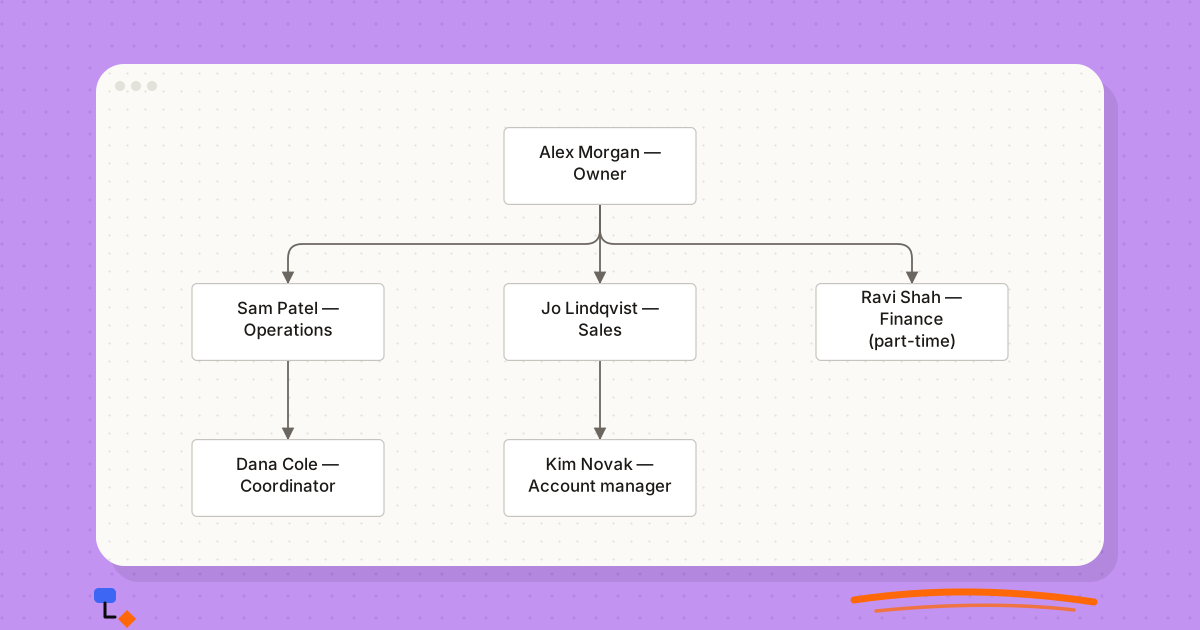
Diagrams often hold the most sensitive information in a project. An architecture diagram shows where the database sits and which services can reach it. An org chart draft shows who is about to be moved, promoted or made redundant. A client's sitemap reveals a product they have not announced. Yet these are routinely drawn in tools that store every keystroke on someone else's server, behind an account created years ago with a password nobody remembers.
For a lot of work that is a reasonable trade. For some it is not. Local-first tools take the other side of that trade: the diagram lives on your device, and leaves it only when you decide. That brings real benefits and real costs, and both are worth understanding before choosing.
What "local-first" means
The phrase was popularised by a 2019 essay from the research lab Ink & Switch, which argued that software should treat the copy of your data on your own device as the primary one, with any server acting as a helper rather than the owner. In its fullest form, local-first software also syncs between devices and supports collaboration, using techniques that merge edits without a central server deciding.
In everyday use the term is looser. When people call a diagram tool local-first, they usually mean three things:
- Your work is saved on your device, not on the vendor's server.
- The app works without an internet connection once it has loaded.
- Nothing is uploaded unless you explicitly export, send or share it yourself.
Some tools meet all three and add sync on top. Others, including DiagramDock, meet the three and stop there: no sync, no server copy. It is worth being precise about which kind you are using, because the trade-offs differ.
What stays on the device
A browser-based local tool has to keep data somewhere. Modern browsers provide a built-in database called IndexedDB, scoped to each website, which can hold structured data and files. A diagram tool can save every node, connector, label and note there, and read it back when you return.
| Item | Server-based tool | Local tool |
|---|---|---|
| Diagram content | Stored on the vendor's servers | Stored in the browser on your device |
| Account details | Email, password or single sign-on | None required |
| Working offline | Limited or unavailable | Works after the first load |
| Who can technically read it | You, plus anyone the vendor's systems allow | Anyone with access to your device and browser profile |
| What happens if the vendor shuts down | Depends on export options and notice | Saved data stays on your device; exports stay readable |
The fourth row deserves attention. Local storage moves the security question rather than removing it. Your diagrams are as private as your laptop: a shared machine, an unlocked screen or a compromised browser profile exposes them just as a breached server would. For most people a personal, encrypted, password-protected device is a smaller risk than a third-party account, but it is still a risk.
The trade-offs, stated plainly
Local-first tools are sometimes presented as simply better. They are not. They give up things that server-based tools do well, and anyone choosing one should know exactly what.
- No sync. A diagram saved in the browser on your work laptop is not on your home computer, and not in a different browser on the same laptop.
- No real-time collaboration. Two people cannot edit the same diagram at once. Sharing means exporting a file and sending it.
- No comments from colleagues inside the tool. Feedback arrives by email or chat, attached to an export.
- Clearing browser data deletes your work. Clearing site data, using a cleanup utility, or working in a private window that discards storage when closed can all remove diagrams.
- Backups are your job. No vendor holds a copy to restore from. If you do not export or back up, there is nothing to recover.
The single most important habit with any browser-stored tool: before clearing browsing data, reinstalling a browser or switching machines, export a backup and check that the file opens or is where you expect it to be.
None of these is a defect to be fixed later. They follow directly from not having a server, and they are the price of the privacy benefit. A tool that claimed to be fully local and also offered live collaboration would need to be explaining how.
A backup routine that actually works
Because nobody else holds a copy, the backup habit is the difference between a local tool being safe and being a liability. It does not need to be elaborate. It needs to be regular and to put the copy somewhere the browser cannot reach.
- Back up at the end of any session where you changed something you would mind losing, not on a calendar schedule you will forget.
- Save the backup outside the browser's own storage: a synced folder, an encrypted drive or an external disk, according to how sensitive the work is.
- Name backups with the date, so the newest is obvious and an older one is available if a recent change was a mistake.
- Before clearing browser data, changing browser profile or handing in a laptop, make one more backup and check the file is where you think it is.
- For finished diagrams, also keep an export in an open format such as SVG or PDF. It will still open years from now, whatever happens to the tool.
Treat the backup location with the same care as the diagrams. A confidential org chart draft saved to a widely shared folder has lost the privacy that was the reason for drawing it locally.
When local-first is the right choice
The pattern is consistent: local tools suit work that is sensitive, owned by one person at a time, and shared as a finished document rather than edited together.
Sensitive architecture
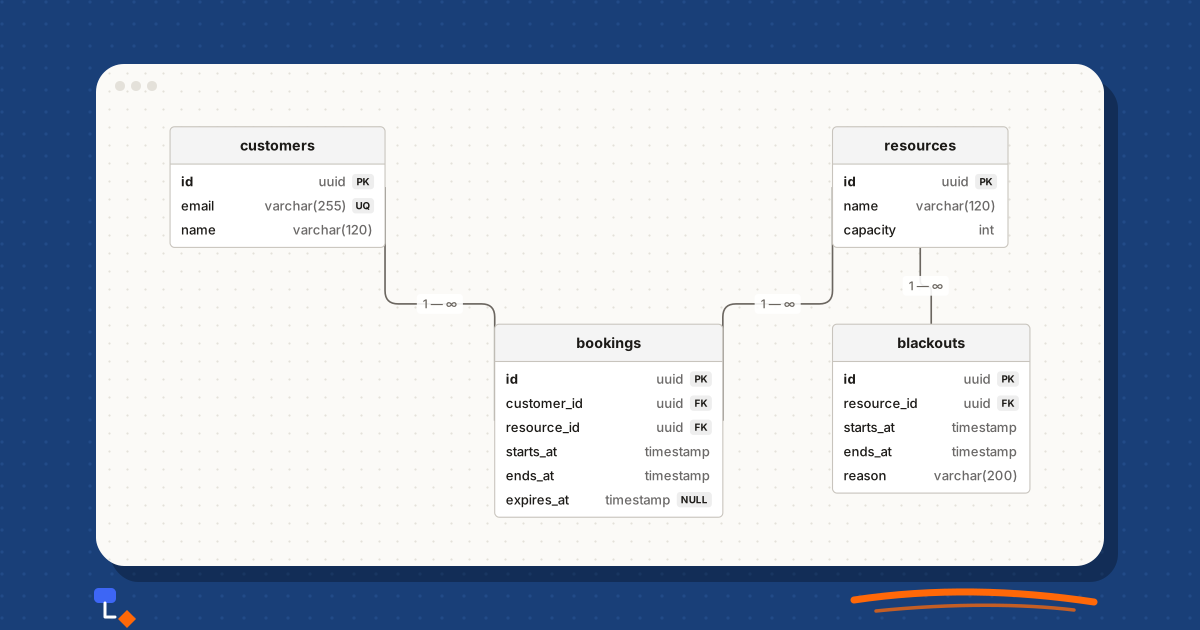
Security reviews, authentication flows, network layouts and database schemas describe exactly how a system can be attacked. Keeping them off third-party servers reduces the number of places they can leak from. Pasting real CREATE TABLE statements into a tool to visualise a schema is safer when the tool parses them in the browser and never sends them anywhere.
%20scale(0.77)%20translate(0%2C0)%22%3E%3Cline%20x1%3D%2245%22%20y1%3D%2255%22%20x2%3D%22340%22%20y2%3D%2232%22%20stroke%3D%22%236b6660%22%20stroke-width%3D%221.5%22%2F%3E%3Cline%20x1%3D%22340%22%20y1%3D%2232%22%20x2%3D%22600%22%20y2%3D%2232%22%20stroke%3D%22%236b6660%22%20stroke-width%3D%221.5%22%2F%3E%3Cline%20x1%3D%22600%22%20y1%3D%2232%22%20x2%3D%22860%22%20y2%3D%2232%22%20stroke%3D%22%236b6660%22%20stroke-width%3D%221.5%22%2F%3E%3Cline%20x1%3D%22860%22%20y1%3D%2232%22%20x2%3D%22600%22%20y2%3D%2232%22%20stroke%3D%22%236b6660%22%20stroke-width%3D%221.5%22%20stroke-dasharray%3D%226%204%22%2F%3E%3Cline%20x1%3D%22600%22%20y1%3D%2232%22%20x2%3D%22340%22%20y2%3D%2232%22%20stroke%3D%22%236b6660%22%20stroke-width%3D%221.5%22%20stroke-dasharray%3D%226%204%22%2F%3E%3Cline%20x1%3D%22340%22%20y1%3D%2232%22%20x2%3D%2245%22%20y2%3D%2255%22%20stroke%3D%22%236b6660%22%20stroke-width%3D%221.5%22%20stroke-dasharray%3D%226%204%22%2F%3E%3Cg%20transform%3D%22translate(0%2C0)%22%20opacity%3D%221%22%3E%3Cpath%20d%3D%22M25.2%2C24.2%20a19.8%2C19.8%200%201%200%2039.6%2C0%20a19.8%2C19.8%200%201%200%20-39.6%2C0%20Z%20M9%2C110%20L9%2C70.32%20Q45%2C48.95%2081%2C70.32%20L81%2C110%20Z%22%20fill%3D%22%23ffffff%22%20stroke%3D%22%23c8c4bd%22%20stroke-width%3D%221%22%2F%3E%3C%2Fg%3E%3Cg%20transform%3D%22translate(260%2C0)%22%20opacity%3D%221%22%3E%3Crect%20x%3D%220%22%20y%3D%220%22%20width%3D%22160%22%20height%3D%2264%22%20rx%3D%220%22%20fill%3D%22%23ffffff%22%20stroke%3D%22%23c8c4bd%22%20stroke-width%3D%221%22%2F%3E%3C%2Fg%3E%3Cg%20transform%3D%22translate(520%2C0)%22%20opacity%3D%221%22%3E%3Crect%20x%3D%220%22%20y%3D%220%22%20width%3D%22160%22%20height%3D%2264%22%20rx%3D%220%22%20fill%3D%22%23ffffff%22%20stroke%3D%22%23c8c4bd%22%20stroke-width%3D%221%22%2F%3E%3C%2Fg%3E%3Cg%20transform%3D%22translate(780%2C0)%22%20opacity%3D%221%22%3E%3Crect%20x%3D%220%22%20y%3D%220%22%20width%3D%22160%22%20height%3D%2264%22%20rx%3D%220%22%20fill%3D%22%23ffffff%22%20stroke%3D%22%23c8c4bd%22%20stroke-width%3D%221%22%2F%3E%3C%2Fg%3E%3C%2Fg%3E%3C%2Fsvg%3E)
HR org charts and restructures
A proposed reorganisation is among the most sensitive documents a company produces. Drafts name individuals and imply decisions that have not been communicated. Drawing those drafts in a local tool means no shared folder, no link that can be forwarded, and no stray notification to the people affected.
%20scale(1.07)%20translate(-260%2C0)%22%3E%3Cline%20x1%3D%22600%22%20y1%3D%2232%22%20x2%3D%22340%22%20y2%3D%22162%22%20stroke%3D%22%236b6660%22%20stroke-width%3D%221.5%22%2F%3E%3Cline%20x1%3D%22600%22%20y1%3D%2232%22%20x2%3D%22600%22%20y2%3D%22162%22%20stroke%3D%22%236b6660%22%20stroke-width%3D%221.5%22%2F%3E%3Cline%20x1%3D%22600%22%20y1%3D%2232%22%20x2%3D%22860%22%20y2%3D%22162%22%20stroke%3D%22%236b6660%22%20stroke-width%3D%221.5%22%2F%3E%3Cline%20x1%3D%22340%22%20y1%3D%22162%22%20x2%3D%22340%22%20y2%3D%22292%22%20stroke%3D%22%236b6660%22%20stroke-width%3D%221.5%22%2F%3E%3Cline%20x1%3D%22600%22%20y1%3D%22162%22%20x2%3D%22600%22%20y2%3D%22292%22%20stroke%3D%22%236b6660%22%20stroke-width%3D%221.5%22%2F%3E%3Cline%20x1%3D%22860%22%20y1%3D%22162%22%20x2%3D%22860%22%20y2%3D%22292%22%20stroke%3D%22%236b6660%22%20stroke-width%3D%221.5%22%2F%3E%3Cg%20transform%3D%22translate(520%2C0)%22%20opacity%3D%221%22%3E%3Crect%20x%3D%220%22%20y%3D%220%22%20width%3D%22160%22%20height%3D%2264%22%20rx%3D%224%22%20fill%3D%22%23ffffff%22%20stroke%3D%22%23c8c4bd%22%20stroke-width%3D%221%22%2F%3E%3C%2Fg%3E%3Cg%20transform%3D%22translate(260%2C130)%22%20opacity%3D%221%22%3E%3Crect%20x%3D%220%22%20y%3D%220%22%20width%3D%22160%22%20height%3D%2264%22%20rx%3D%224%22%20fill%3D%22%23ffffff%22%20stroke%3D%22%23c8c4bd%22%20stroke-width%3D%221%22%2F%3E%3C%2Fg%3E%3Cg%20transform%3D%22translate(520%2C130)%22%20opacity%3D%221%22%3E%3Crect%20x%3D%220%22%20y%3D%220%22%20width%3D%22160%22%20height%3D%2264%22%20rx%3D%224%22%20fill%3D%22%23ffffff%22%20stroke%3D%22%23c8c4bd%22%20stroke-width%3D%221%22%2F%3E%3C%2Fg%3E%3Cg%20transform%3D%22translate(780%2C130)%22%20opacity%3D%221%22%3E%3Crect%20x%3D%220%22%20y%3D%220%22%20width%3D%22160%22%20height%3D%2264%22%20rx%3D%224%22%20fill%3D%22%23ffffff%22%20stroke%3D%22%23c8c4bd%22%20stroke-width%3D%221%22%2F%3E%3C%2Fg%3E%3Cg%20transform%3D%22translate(260%2C260)%22%20opacity%3D%221%22%3E%3Crect%20x%3D%220%22%20y%3D%220%22%20width%3D%22160%22%20height%3D%2264%22%20rx%3D%224%22%20fill%3D%22%23ffffff%22%20stroke%3D%22%23c8c4bd%22%20stroke-width%3D%221%22%2F%3E%3C%2Fg%3E%3Cg%20transform%3D%22translate(520%2C260)%22%20opacity%3D%221%22%3E%3Crect%20x%3D%220%22%20y%3D%220%22%20width%3D%22160%22%20height%3D%2264%22%20rx%3D%224%22%20fill%3D%22%23ffffff%22%20stroke%3D%22%23c8c4bd%22%20stroke-width%3D%221%22%2F%3E%3C%2Fg%3E%3Cg%20transform%3D%22translate(780%2C260)%22%20opacity%3D%221%22%3E%3Crect%20x%3D%220%22%20y%3D%220%22%20width%3D%22160%22%20height%3D%2264%22%20rx%3D%224%22%20fill%3D%22%23ffffff%22%20stroke%3D%22%23c8c4bd%22%20stroke-width%3D%221%22%2F%3E%3C%2Fg%3E%3C%2Fg%3E%3C%2Fsvg%3E)
Client work
Agencies and consultants often work under confidentiality agreements that restrict where client information may be stored. A local tool avoids adding another processor to the list. The finished diagram goes to the client as a PDF, which is usually what they wanted anyway.
Data models are a common case. A client's schema reveals what they track about their customers and how their sales process really works, even when no customer data is included.
%20scale(1.03)%20translate(0%2C0)%22%3E%3Cline%20x1%3D%2286%22%20y1%3D%22290%22%20x2%3D%22100%22%20y2%3D%2255%22%20stroke%3D%22%236b6660%22%20stroke-width%3D%221.5%22%2F%3E%3Cline%20x1%3D%22386%22%20y1%3D%2277%22%20x2%3D%22100%22%20y2%3D%2255%22%20stroke%3D%22%236b6660%22%20stroke-width%3D%221.5%22%2F%3E%3Cline%20x1%3D%22402%22%20y1%3D%22301%22%20x2%3D%22386%22%20y2%3D%2277%22%20stroke%3D%22%236b6660%22%20stroke-width%3D%221.5%22%2F%3E%3Cline%20x1%3D%22402%22%20y1%3D%22301%22%20x2%3D%2286%22%20y2%3D%22290%22%20stroke%3D%22%236b6660%22%20stroke-width%3D%221.5%22%2F%3E%3Cg%20transform%3D%22translate(0%2C0)%22%20opacity%3D%221%22%3E%3Crect%20x%3D%220%22%20y%3D%220%22%20width%3D%22200%22%20height%3D%22110%22%20rx%3D%220%22%20fill%3D%22%23ffffff%22%20stroke%3D%22%23c8c4bd%22%20stroke-width%3D%221%22%2F%3E%3C%2Fg%3E%3Cg%20transform%3D%22translate(0%2C224)%22%20opacity%3D%221%22%3E%3Crect%20x%3D%220%22%20y%3D%220%22%20width%3D%22172%22%20height%3D%22132%22%20rx%3D%220%22%20fill%3D%22%23ffffff%22%20stroke%3D%22%23c8c4bd%22%20stroke-width%3D%221%22%2F%3E%3C%2Fg%3E%3Cg%20transform%3D%22translate(300%2C0)%22%20opacity%3D%221%22%3E%3Crect%20x%3D%220%22%20y%3D%220%22%20width%3D%22172%22%20height%3D%22154%22%20rx%3D%220%22%20fill%3D%22%23ffffff%22%20stroke%3D%22%23c8c4bd%22%20stroke-width%3D%221%22%2F%3E%3C%2Fg%3E%3Cg%20transform%3D%22translate(300%2C224)%22%20opacity%3D%221%22%3E%3Crect%20x%3D%220%22%20y%3D%220%22%20width%3D%22204%22%20height%3D%22154%22%20rx%3D%220%22%20fill%3D%22%23ffffff%22%20stroke%3D%22%23c8c4bd%22%20stroke-width%3D%221%22%2F%3E%3C%2Fg%3E%3C%2Fg%3E%3C%2Fsvg%3E)
Drafts and thinking
Not everything is confidential; some of it is just unfinished. A rough mind map or a half-drawn process is easier to make freely when it is not visible in a team workspace, and when opening the tool does not require signing in.
When it is the wrong choice
If several people need to edit the same diagram during the same week, a local tool will frustrate everyone. Passing exported files around produces versions named final, final-2 and final-actually, and someone's changes get lost. A shared architecture diagram that the whole engineering team maintains, a sprint board, a workshop where six people add sticky notes at once: these need a collaborative tool with a server behind it.
The same applies when you need to move between devices constantly, or when an organisation requires central retention and audit of documents. A local tool cannot satisfy a policy that says every document must live in the company's managed storage.
| Situation | Better fit |
|---|---|
| One person drafting a sensitive diagram | Local |
| A finished diagram sent as a document | Local, then export |
| Several people editing the same diagram this week | Collaborative |
| Workshop with live input from a group | Collaborative |
| Working across several computers daily | Collaborative, or local with disciplined exports |
| Company policy requires central storage | Whatever the policy specifies |
Worked example: a confidential restructure
An operations director at a sixty-person company has been asked to propose a new structure for two departments before a board meeting. Only she and the managing director know about it.
- She exports the current structure from the HR system as a spreadsheet with id, name, title, manager id and department columns, and imports it into a local org chart tool on her own laptop.
- The import flags two rows whose manager ids point to people who have left. She fixes them, so the current chart is accurate before she starts changing it.
- She builds two alternative structures as separate diagrams, each with notes on the reasoning attached to the relevant boxes.
- Before the board meeting she exports one PDF per option, with the notes excluded, because the notes contain her candid views on individuals.
- She saves a workspace backup to the company's encrypted drive, so the drafts survive if the laptop fails.
- After the decision is announced, the chosen structure becomes the new public org chart, and the rejected option stays in her backup rather than in a shared folder.
Nothing in this process touched a third-party server until she chose to put a file somewhere. The trade-off was also clear: had the managing director wanted to edit the options alongside her, they would have been passing files back and forth.
How DiagramDock handles this
DiagramDock is a free diagramming app that runs entirely in the browser with no account. Diagrams are stored locally in the browser's IndexedDB and are never uploaded. After the first load it works offline. When you paste CREATE TABLE statements to visualise a schema, the SQL is parsed as text in the browser and never executed.
The limits are the ones described above. There is no sync between devices, no real-time collaboration, no sharing links and no version history. Clearing browser data deletes your diagrams. A workspace backup, saved as a ZIP file, protects them, and keeping one somewhere outside the browser is the habit that matters most.
- Export to SVG or PDF for vector output with selectable text, or PNG for images.
- Save a DiagramDock project file (JSON) for a single diagram.
- Export Mermaid text for flowcharts, sequence, class, ER and mind map diagrams, so the content can live in a repository alongside code.
- Include or exclude local notes on elements when exporting, which is how private reasoning stays private in a shared PDF.
For private, single-author work, that model is a sensible default. For a team editing together, it is the wrong tool, and it is better to say so plainly.
Questions
- What does local-first mean?
- Software that keeps your data on your own device as the primary copy, rather than on a company's server. The app works without a network connection, and anything that leaves the device does so because you exported or sent it.
- Are browser-based diagram tools private?
- It depends on where the diagram is saved. Some browser apps upload every change to a server; others store data in the browser itself. Check whether an account is required and whether the app works offline, then read its privacy policy for the details.
- What happens to my diagrams if I clear my browser data?
- In a tool that stores diagrams in the browser, clearing site data for that site deletes them. Private or incognito windows usually discard storage when closed as well. Keep regular backups outside the browser if the work matters.
- Can I use a local-first tool with my team?
- You can share exported files, but you cannot edit the same diagram together at the same time unless the tool has a sync layer. If several people need to change a diagram during the same week, a collaborative tool is usually the better choice.
- Does DiagramDock upload my diagrams?
- No. DiagramDock stores diagrams in your browser's IndexedDB and has no accounts or server-side storage. Pasted SQL for ER diagrams is parsed as text in the browser and never executed.
Keep reading
Business processes9 min read
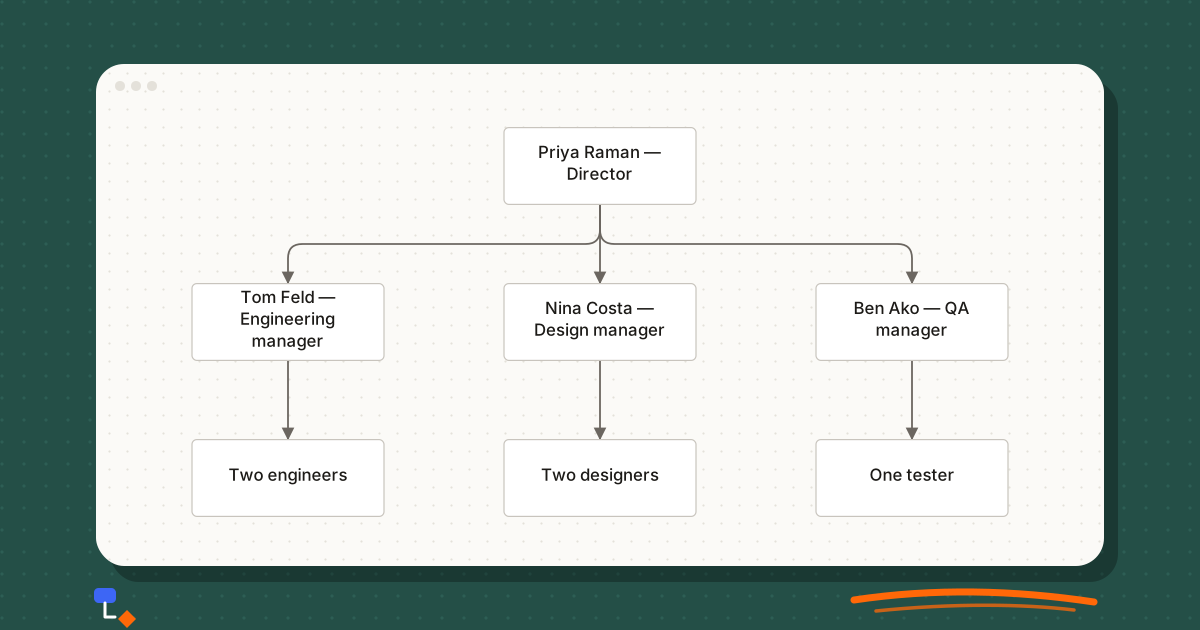
Org charts are more useful than a list of job titles
What an org chart shows that a staff list hides: span of control, depth, gaps and single points of failure, plus how to build one from a spreadsheet.
Diagramming9 min read
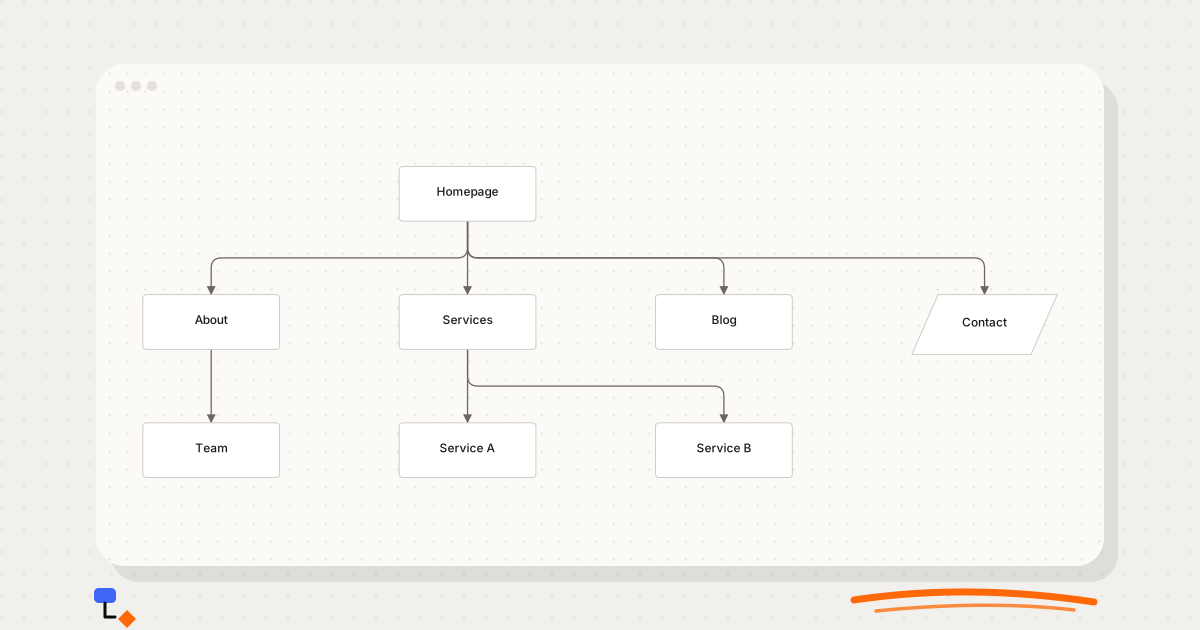
Why website projects benefit from a sitemap diagram
How a visual sitemap exposes hierarchy, depth, orphan and duplicate pages before design starts, with a worked example of a small business site redesign.
Diagramming9 min read
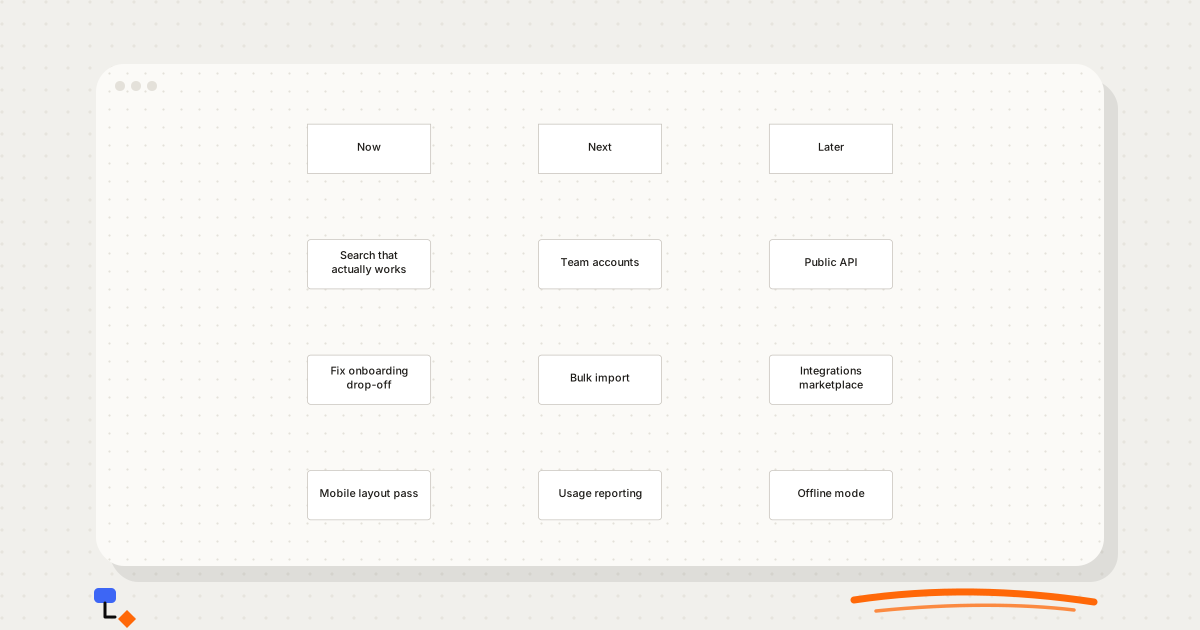
What belongs on a product roadmap?
Outcomes or features, Now/Next/Later or dates, and what to leave off: a practical guide to product roadmaps that stay honest as plans change.
Technical diagrams9 min read
Visualising a database before writing the schema
A design-first workflow for databases: nouns to entities, relationships before columns, many-to-many found early, then the diagram turned into CREATE TABLE.